Custom Components
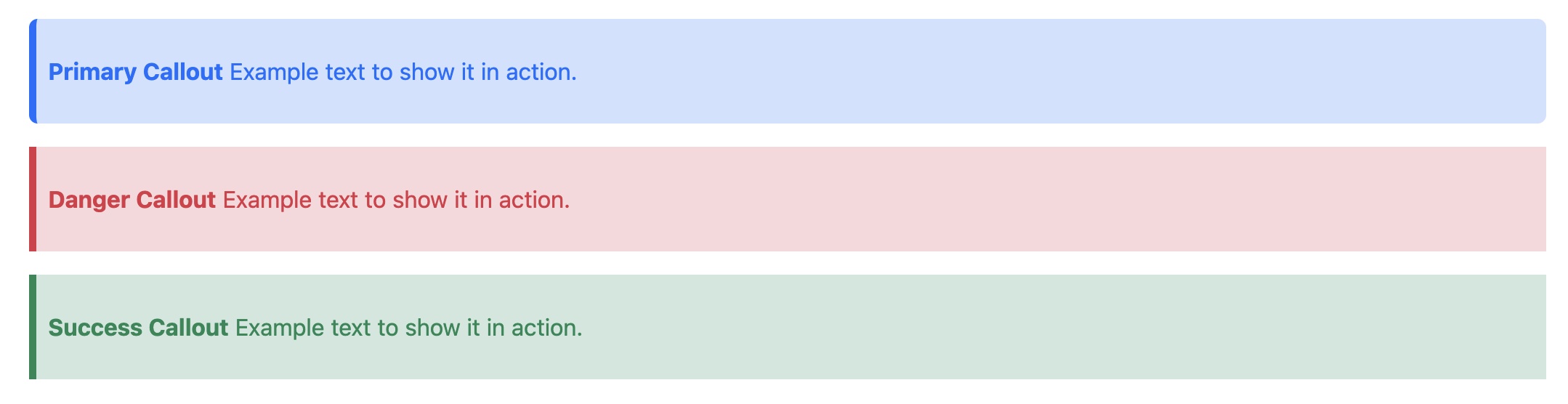
Extend the Bootstrap plugin by creating specialized DITA elements that map to specific Bootstrap components, such as Callouts.
This scenario walks through the process of creating a custom component plug-in
(com.example.bootstrap-component) that defines a new <callout> element.
This specialized element automatically applies Bootstrap utility classes.
Procedure
-
In the plugins directory, create a directory structure like the following:
com.example.bootstrap-component
├── Customization
│   └── xsl
│       └── callout.xsl
├── dtd
│   └── base
│       ├── bootstrap-custom-topic.dtd
│       ├── bootstrapCustomDomain.ent
│       └── bootstrapCustomDomain.mod
├── catalog.xml
├── plugin.xml
└── xsl
    └── xhtml.xsl
Figure 1. Plugin directory structure -
Define the specialization entities in bootstrapCustomDomain.ent:
<?xml version="1.0" encoding="UTF-8"?>
<!-- MODULE: DITA Bootstrap Custom Domain Entities -->

<!ENTITY % callout "callout">
<!ENTITY % bootstrapCustom-d-section "callout">
<!ENTITY bootstrapCustom-d-att "(topic bootstrapCustom-d)">
Figure 2. Sample bootstrapCustomDomain.ent file -
Define the specialization module in bootstrapCustomDomain.mod:
<!-- ============================================================= -->
<!--                   BOOTSTRAP CUSTOM DOMAIN                     -->
<!-- ============================================================= -->

<!-- ============================================================= -->
<!--                    ELEMENT DECLARATIONS                       -->
<!-- ============================================================= -->

<!ENTITY % callout.content "(%section.cnt;)*">
<!ENTITY % callout.attributes
  "spectitle CDATA #IMPLIED
   color CDATA #IMPLIED
   rounded (yes | no | 0 | 1 | 2 | 3 | 4 | 5 | circle | pill) #IMPLIED
   outputclass CDATA #IMPLIED
   %univ-atts;">
<!ELEMENT callout %callout.content;>
<!ATTLIST callout %callout.attributes;>

<!-- ============================================================= -->
<!--                    SPECIALIZATION ATTRIBUTE DECLARATIONS      -->
<!-- ============================================================= -->

<!ATTLIST callout class CDATA "+ topic/section bootstrapCustom-d/callout ">
Figure 3. Sample bootstrapCustomDomain.mod file -
Create a DTD Shell (bootstrap-custom-topic.dtd) to integrate the domain. The order of declarations is critical due to the XML DTD "First-Win" rule, which specifies that only the first definition of a parameter entity is authoritative.
The DTD shell must follow this specific sequence to ensure specializations are correctly recognized:
- Domain Entities: Declare the entities for your custom domain.
- Domain Extensions: Redefine the base content models (e.g.,
%section;) to include your new elements. This MUST happen before structural modules are loaded. - Structural Modules: Finally, import the base topic.mod and your custom .mod file.
<?xml version="1.0" encoding="UTF-8"?>
<!-- ============================================================= -->
<!--                    BOOTSTRAP CUSTOM TOPIC DTD SHELL           -->
<!-- ============================================================= -->

<!-- 1. ELEMENT NAME ENTITIES -->
<!ENTITY % callout "callout">

<!-- 2. DOMAIN ENTITY DECLARATIONS -->
<!ENTITY % hi-d-dec PUBLIC "-//OASIS//ENTITIES DITA 1.3 Highlight Domain//EN" "highlightDomain.ent">%hi-d-dec;
<!ENTITY % ut-d-dec PUBLIC "-//OASIS//ENTITIES DITA 1.3 Utilities Domain//EN" "utilitiesDomain.ent">%ut-d-dec;
<!ENTITY % indexing-d-dec PUBLIC "-//OASIS//ENTITIES DITA 1.3 Indexing Domain//EN" "indexingDomain.ent">%indexing-d-dec;
<!ENTITY % hazard-d-dec PUBLIC "-//OASIS//ENTITIES DITA 1.3 Hazard Statement Domain//EN" "hazardstatementDomain.ent">%hazard-d-dec;
<!ENTITY % sw-d-dec PUBLIC "-//OASIS//ENTITIES DITA 1.3 Software Domain//EN" "softwareDomain.ent">%sw-d-dec;
<!ENTITY % pr-d-dec PUBLIC "-//OASIS//ENTITIES DITA 1.3 Programming Domain//EN" "programmingDomain.ent">%pr-d-dec;
<!ENTITY % ui-d-dec PUBLIC "-//OASIS//ENTITIES DITA 1.3 User Interface Domain//EN" "uiDomain.ent">%ui-d-dec;
<!ENTITY % xml-d-dec PUBLIC "-//OASIS//ENTITIES DITA 1.3 XML Domain//EN" "xmlDomain.ent">%xml-d-dec;

<!-- Bootstrap and Custom Callout entities -->
<!ENTITY % bootstrap-d-dec PUBLIC "-//DITA Bootstrap//ENTITIES DITA Bootstrap Domain//EN" "bootstrapDomain.ent">%bootstrap-d-dec;
<!ENTITY % bootstrapCustom-d-dec PUBLIC "//Example//ENTITIES DITA Bootstrap Custom Domain//EN" "bootstrapCustomDomain.ent">%bootstrapCustom-d-dec;

<!-- 3. DOMAIN ATTRIBUTES DECLARATIONS -->
<!ENTITY % deliveryTargetAtt-d-dec PUBLIC "-//OASIS//ENTITIES DITA 1.3 Delivery Target Attribute Domain//EN" "deliveryTargetAttDomain.ent">%deliveryTargetAtt-d-dec;

<!-- 4. DOMAIN EXTENSIONS - TOP DEFINTIONS WIN -->
<!ENTITY % div          "div | %bootstrap-d-div;">
<!ENTITY % ph           "ph | %hi-d-ph; | %pr-d-ph; | %bootstrap-d-ph; | %sw-d-ph; | %ui-d-ph;">
<!ENTITY % xref         "xref | %bootstrap-d-xref;">
<!ENTITY % ul           "ul | %bootstrap-d-ul;">
<!ENTITY % li           "li | %bootstrap-d-li;">
<!ENTITY % image        "image | %bootstrap-d-image;">
<!ENTITY % fig          "fig | %ut-d-fig; | %pr-d-fig;">
<!ENTITY % keyword      "keyword | %xml-d-keyword; | %pr-d-keyword; | %sw-d-keyword; | %ui-d-keyword;">
<!ENTITY % pre          "pre | %pr-d-pre; | %sw-d-pre; | %ui-d-pre;">
<!ENTITY % dl           "dl | %pr-d-dl;">
<!ENTITY % bodydiv      "bodydiv | %bootstrap-d-bodydiv;">
<!ENTITY % section      "section | %bootstrap-d-section; | %bootstrapCustom-d-section;">

<!-- 5. DOMAIN ATTRIBUTE EXTENSIONS -->
<!ENTITY % props-attribute-extensions "%deliveryTargetAtt-d-attribute;">

<!-- 6. TOPIC ELEMENT INTEGRATION -->
<!ENTITY % topic-mod-def PUBLIC "-//OASIS//ELEMENTS DITA 1.3 Topic//EN" "topic.mod">%topic-mod-def;

<!-- 7. DOMAIN ELEMENT INTEGRATION -->
<!ENTITY % bootstrap-d-def PUBLIC "-//DITA Bootstrap//ELEMENTS DITA Bootstrap Domain//EN" "bootstrapDomain.mod">%bootstrap-d-def;
<!ENTITY % bootstrapCustom-d-def PUBLIC "//Example//ELEMENTS DITA Bootstrap Custom Domain//EN" "bootstrapCustomDomain.mod">%bootstrapCustom-d-def;

<!ENTITY % hi-d-def PUBLIC "-//OASIS//ELEMENTS DITA 1.3 Highlight Domain//EN" "highlightDomain.mod">%hi-d-def;
<!ENTITY % ut-d-def PUBLIC "-//OASIS//ELEMENTS DITA 1.3 Utilities Domain//EN" "utilitiesDomain.mod">%ut-d-def;
<!ENTITY % indexing-d-def PUBLIC "-//OASIS//ELEMENTS DITA 1.3 Indexing Domain//EN" "indexingDomain.mod">%indexing-d-def;
<!ENTITY % hazard-d-def PUBLIC "-//OASIS//ELEMENTS DITA 1.3 Hazard Statement Domain//EN" "hazardstatementDomain.mod">%hazard-d-def;
<!ENTITY % sw-d-def PUBLIC "-//OASIS//ELEMENTS DITA 1.3 Software Domain//EN" "softwareDomain.mod">%sw-d-def;
<!ENTITY % pr-d-def PUBLIC "-//OASIS//ELEMENTS DITA 1.3 Programming Domain//EN" "programmingDomain.mod">%pr-d-def;
<!ENTITY % ui-d-def PUBLIC "-//OASIS//ELEMENTS DITA 1.3 User Interface Domain//EN" "uiDomain.mod">%ui-d-def;
<!ENTITY % xml-d-def PUBLIC "-//OASIS//ELEMENTS DITA 1.3 XML Domain//EN" "xmlDomain.mod">%xml-d-def;

<!-- Specialization of element ancestors -->
<!ENTITY included-domains "&hi-d-att; &ut-d-att; &indexing-d-att; &hazard-d-att; &sw-d-att; &pr-d-att; &ui-d-att; &xml-d-att; &bootstrap-d-att; &bootstrapCustom-d-att; &deliveryTargetAtt-d-att;">
Figure 4. Sample bootstrap-custom-topic.dtd file -
Implement the component-specific XSLT transformation in callout.xsl. Use a high priority to override default behavior as necessary:
<!-- Handle the callout element transformation -->
<xsl:template match="*[contains(@class, 'bootstrapCustom-d/callout')]">
  <div>
    <xsl:call-template name="commonattributes"/>
    <xsl:call-template name="setidaname"/>
    <!-- Add special handling as necessary -->
    <xsl:apply-templates/>
  </div>
</xsl:template>

<!-- Add custom output class handling for the new component -->
<xsl:template match="*[contains(@class, 'bootstrapCustom-d/callout')]" mode="set-output-class" priority="50">
  <xsl:variable name="color" select="(if (@color) then @color else 'primary')"/>
  <xsl:variable name="classes" as="xs:string*">
     <xsl:sequence select="tokenize('callout p-2 border-start border-5', '\s+')"/>
     <xsl:sequence select="concat('bg-', $color, '-subtle')"/>
     <xsl:sequence select="concat('border-', $color)"/>
     <xsl:sequence select="concat('callout-', $color)"/>
     <xsl:sequence select="tokenize(normalize-space($ancestry), '\s+')"/>
  </xsl:variable>
  <xsl:attribute name="class" select="normalize-space(string-join(distinct-values($classes), ' '))"/>
</xsl:template>
Figure 5. Sample callout.xsl file -
Create a central hub in xsl/xhtml.xsl to include your custom transformations:
<?xml version="1.0" encoding="utf-8"?>
<xsl:stylesheet
  version="2.0"
  xmlns:dita-ot="http://dita-ot.sourceforge.net/ns/201007/dita-ot"
  xmlns:xs="http://www.w3.org/2001/XMLSchema"
  xmlns:xsl="http://www.w3.org/1999/XSL/Transform"
  exclude-result-prefixes="xs dita-ot"
>
  <xsl:include href="../Customization/xsl/callout.xsl"/>

</xsl:stylesheet>
Figure 6. Sample xhtml.xsl hub file -
Register the plugin hub in plugin.xml using the dita.xsl.html5-bootstrap extension point:
<plugin id="com.example.bootstrap-component">
  <feature extension="dita.xsl.html5-bootstrap" value="xsl/xhtml.xsl" type="file" />
  <feature extension="dita.specialization.catalog.relative" file="catalog.xml"/>
</plugin>
Figure 7. Sample plugin.xml file
Example Usage
Once installed, authors can use the specialized element in DITA content:
<callout color="success">
  <title>Success!</title>
  <p>Further text can be added here.</p>
</callout>